Why Bother?
A while ago I started looking at making a biogas generator, but didn't commission it because I had no way of detecting what gases were coming off it. A few weeks ago I was inspired by someone showing that they had made a DIY gas chromatograph, so thought that if I made one, we could do real experiments on biogas production from household waste to see what works best etc.....
So, our litle project for this Christmas holiday was to make ourselves a DIY gas chromatograph and see if we could use it to detect the difference between CO2 and Methane, which are the two main products I expect to see from the fermentation to produce biogas.
Note that when I talked to some chemists about this they advised that I could do this much more easily using wet chemistry because of the significant differences between CO2 and Methane, but I am a physicist, so something using physical properties sounds much more fun! (It is also much more of a useful education project for Laura, but she didn't know that at the start).
The Principles
A gas chromatograph relies on a constant flow of carrier gas passing through a 'column', which is in a temperature controlled oven. You inject the sample gas into the flow at the inlet of the column, and the constituent parts travel through the column at different rates, so the different constituents come out of the column at different times after injection. See pretty picture from wikipedia article below.
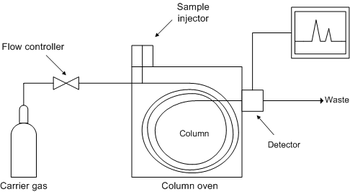
Components of a DIY Chromatograph
Infrastructure
The infrastructure (temperature measurement, temperature control, detector control etc.) can be done using an arduino microcontroller.
Arduino Based Temperature Controller
This was Laura's part of the project - she developed an Arduino programme (sketch) that does the following:
- Measures the resistance of thermistors (assuming they are wired as a potential divider).
- Converts the resistance to temperature in degC.
- Performs 3 term (PID) temperature control by varying an 'analogue' output pin to control the oven temperature (see below for oven details).
- Outputs relevant data (temperatures etc.) to the controlling computer using the USB serial connection on the arduino.
- Responds to commands from the USB serial line to change set point, PID gains etc.
The Arduino Code is here: https://github.com/jones139/arduino-projects/tree/master/gc/oven.
User Interface
We had a difficult design choice for user interface - do we write a 'native' user interface on a computer connected to the arduino, or make a web based system?
I decided to go for a web based system, which means that you can use any computer as the user interface, so we need a little web server. Although some people use Arduino's for this, I thought it would be much easier to use a Raspberry Pi.
We re-cycled the web server code from our Seizure Detector project, which is a simple python web server.
The python programme does the following:
- Listen for web requests.
- If no special commands are given, it serves a simple page showing the chromatograph settings and a graph of the temperature history (which will also be the detector output).
- The main web page includes javascript code to allow bits of it to be updated without refreshing the whole page every time (the html/javascript code is Laura's).
- Respond to specific commands (such as change set point) by sending these to the arduino across the serial line.
- Collect data from the arduino (it sends a set of data every second), and create at time series.
- Use the time series data to plot a graph of temperature history etc.

The web server code is the python files here: https://github.com/jones139/arduino-projects/tree/master/gc (execute runServer.py) to start the web server.
The html and javascript based user interface is all here: https://github.com/jones139/arduino-projects/tree/master/gc/www.
The infrastructure part went well - we have a web interface to a three term temperature controller that works fine, and sends data back to the web server, which produces a graph of the temperature history. You can change set point, controller gains etc over the web interface.
Power Supply and Case
We will need a variety of power supplies (5V for the Raspberry Pi, 12V for heaters, mains for the pump). I had an old computer case in the Attic, so we used that - it has a power supply that gives 5V, 12V high current, +/-12V and 3.3V, so plenty for what we need. The case will also house the finished instrument so it will look neater than most of my projects once I put the lid on!
 | ||
| Case before I removed the old computer boards to make room. - the power supply is at the back. |


Carrier Gas
To keep things simple I propose to use air as the carrier gas, and use a fish tank air pump to push it through the column. Because it is a bit noisy, we made the Arduino and web interface allow you to switch it on and off easily. The pump is mains powered so we used a solid state relay to switch it on and off, and covered the mains connections with plastic to stop us blowing ourselves up with loose wires in the case...
 |
| The air pump with sample injector syringe. |
 |
| Solid state relay mounted in bottom of the case - all the mains connections are covered in clear plastic to avoid them contacting low voltage parts of the equipment. |
Oven
For the oven we need an insulated case and some heaters. For the case we used the old CD drive case from the computer, because it fits in the computer case neatly:

We added some polystyrene insulation to the top to reduce heat loss, and a bit of bubble wrap to the bottom (could not get too much in, or there would be no room in the oven....
The heater element is an aluminium plate cut to the size of the oven with three resistors bolted to it.
A power transistor is also mounted in the case to switch the current flow to the resistors. This means that the 12V power supply only has to go to the oven, and we can provide a 5V switching signal from the arduino to control the heater using the transistor:
 |
| Heater plate with resistors attached, along with power transistor to control the heater current. Note that we had to disconnect the transistor heat sink from the plate because grounding it to earth switched on the transistor, so we had an over-heat fault on first commissioning - the arduino tried to switch off the heaters, but they continued at full power - at least we proved that we can get the oven to just over 90degC... |
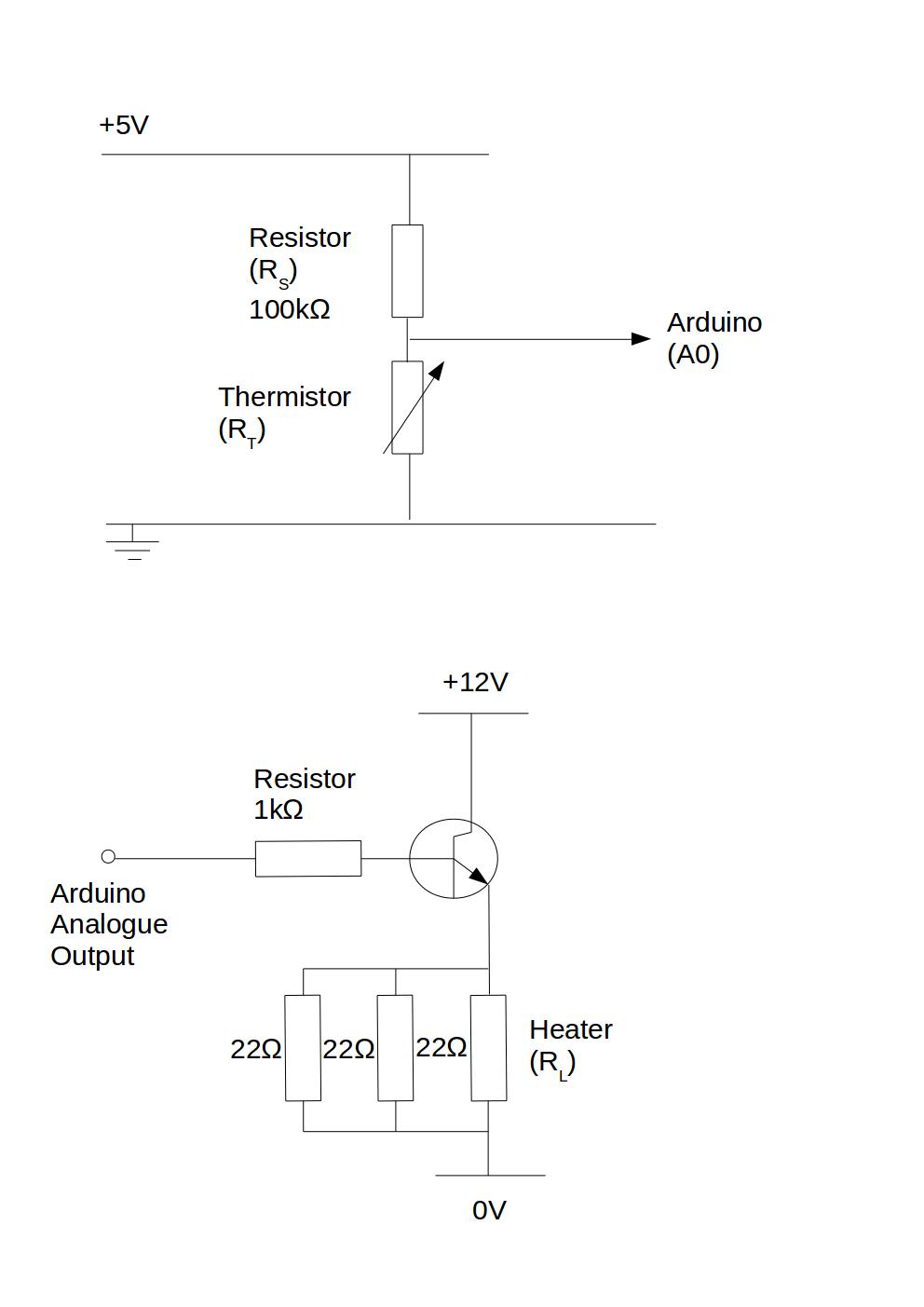 |
| Circuit diagrams for the thermistor measurement and the heater control circuit. |
Detector
The detector is my part, and is the bit that is holding up the project at the moment!
First Version - heat loss to environment
My first go was to rely on the gas coming out of the oven being hot, and looking at the amount of cooling of the sample gas compared to pure carrier gas as it passed through some copper tubes:
Unfortunately the gas flow rate is so low that the gas has cooled to ambient temperature before it gets to the detector, so I can't measure anything useful, so need a re-think.
Second version - heated constantan wire
Next, try a hot wire detector - loop of constantan wire used to heat a thermistor using a constant current source - the temperature above ambient should depend on the thermal properties of the gas surrounding it.
Here my lack of practice at electronics design let me down - I made a high current source using a trusty (>30 year old) 741 op-amp and a power transistor.
 |
| Arduino, along with 741 and power transistor current source (the sense resistor is the big grey cylinder above the arduino). The things in the crocodile clip are the heated and ambient thermistors. |
Unfortunately I was using a 100R resistor to sense the current, and my loop of constantan is only about 1R. This meant that I put a lot more power into the sense resistor than my 'hot' wire - no detectable increase in wire temperature, but smoke and a warming glow from the sense resistor.... Replaced it with the more robust resistor shown in the picture above, which acts as a nice room heater, but no measurable heating of the thermistor.
So, need a higher resistance heater for the thermistor - think I will dismantle a 12V light bulb next....
Summary
Quite an interesting holiday project, but not finished.
What went well:
- Working web interface to an arduino temperature controller
- Working web based data logger.
- Working oven and switchable pump.
- Nice case with useful power supply.
- Laura learned to programme an Arduino, and write javascript web pages
What didn't go well:
- The detector!
- I am out of practice at electronics design, and mis-judged heat losses from very very low gas flow rates!


.jpg)






.png)